
How GitNotifier Drops Bot Comment Spam and Only Sends You Meaningful Notifications
GitHub bots generate massive notification noise. Here is how GitNotifier filters out bot comment spam by default and only delivers the notifications that actually need your attention.
Take a Dependabot or Renovate PR that has been sitting in the queue for a few days. Every merge to main triggers a rebase. Every rebase triggers the code review bot to post a new comment: “No issues found.” Ten merges, ten comments, nothing to act on. Now multiply that across every open dependency PR in the repo.
The native GitHub to Slack integration forwards all of it. No filtering, no distinction between a bot and a teammate. Every comment lands in the channel with the same weight.
How much noise that generates
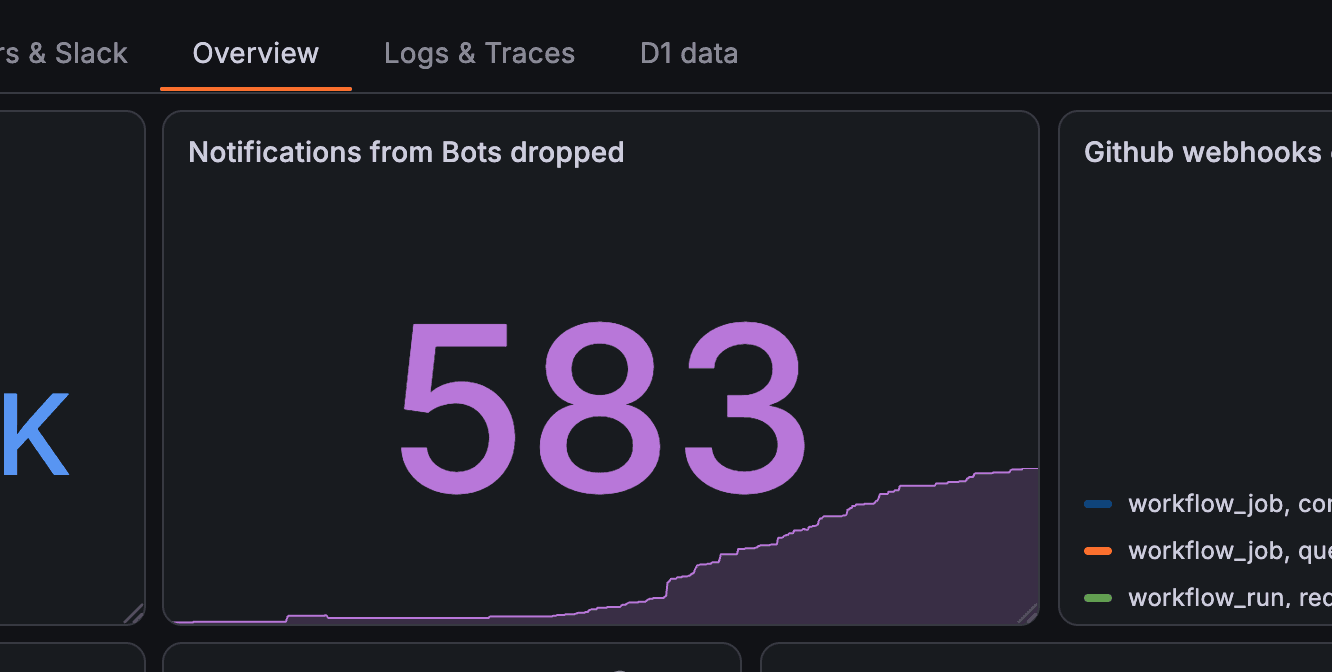
GitNotifier tracks dropped bot notifications across all connected workspaces. On a single day, that count reached 583.
That same day, 428 Slack messages were sent. More bot notifications dropped than actual messages delivered. Each of the 583 would have been a Slack ping under the native integration.

What GitNotifier does by default
GitNotifier drops all notifications from GitHub bots out of the box. No setup required. Any actor whose login ends in [bot] is treated as automated activity and skipped for Slack delivery.
There is one exception: if a bot replies in a thread you are already part of, the notification goes through. A CI failure posted in a PR thread where you have been active is something you should see. A CodeRabbit comment on a Renovate PR you have never opened is not.
Adjusting it to your workflow
The default is intentionally aggressive about dropping bot noise. Some teams want more control. GitNotifier exposes that through the Slack App Home mute settings.
- Turn off bot muting entirely. If you want all bot comments through, disable Mute all comments from bots in the App Home mute settings.
- Mute specific bots only. Add individual logins like
dependabot[bot]orcoderabbitai[bot]to the actor mute list instead. Everything else comes through. - Quiet mode for reviewer comments. When Reviewer Comment Quiet Mode is on, comments on PRs where you are a reviewer are suppressed unless you are directly
@mentioned. Useful if you get pulled into many PRs but only need to act when someone specifically asks for your input. - Mute a specific PR. Run
/gitnotifier mutein Slack to silence a noisy PR entirely, or just its comments, or just its CI events.
Direct @mentions bypass all mute rules. If someone mentions you in a comment, you get the notification regardless of what is muted.
See how these settings fit into a broader Slack pull request notification workflow.
Connect GitHub and Slack in a few minutes
GitNotifier installs via one GitHub App and one Slack App. No YAML, no per-repo configuration. Bot filtering is on by default. Tweak it from Slack App Home if the defaults are not right for your team.
See how teams reduce PR review time with Slack alerts once the noise is out of the way.
Read more
View all articlesGitHub Notifications Are Broken for Small Teams (Here's the Fix)
GitHub notifications create fatigue for small teams. Learn how personal Slack alerts help developers catch reviews, failed builds, and deploy issues faster.
How to Get GitHub Notifications in Slack Not Truncated
GitHub's native Slack integration and tools like Swarmia truncate comments and strip formatting. GitNotifier lets you disable truncation and receive the full comment, converted to native Slack formatting, so you can read and act without clicking through to GitHub.
Slack Notifications for GitHub: Every Option Compared (2026)
Compare every way to get Slack notifications for GitHub in 2026: the native app, GitHub Actions webhooks, Axolo, and GitNotifier, with honest tradeoffs for each.